Odoo 19 is described, almost everywhere, as the release where AI arrived in the ERP. That is true, and it is also the least useful thing to know about it. The buttons are easy to find and easy to try. The question that decides whether you may use them at all — in a regulated company, or in any company with a data protection officer — is where your text goes when you press one.
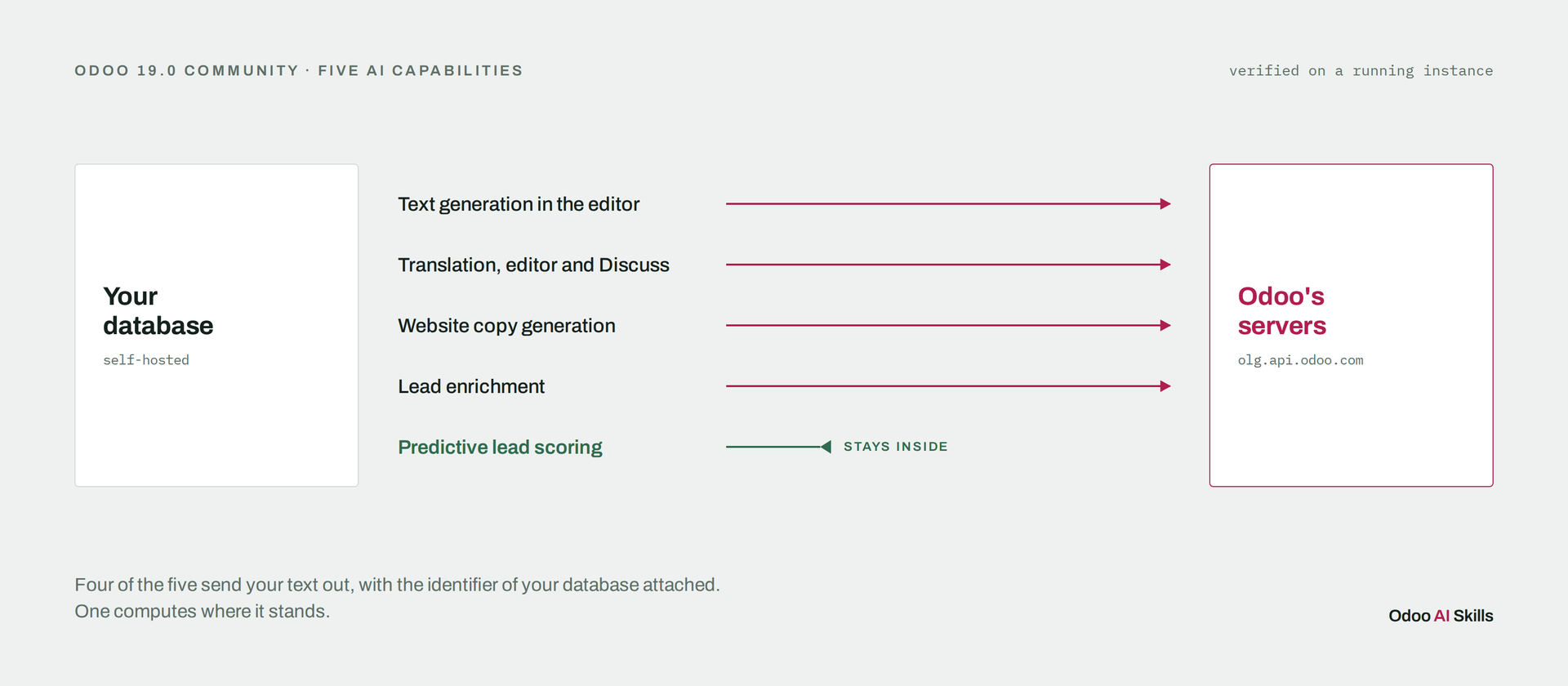
So we read the source of Odoo 19.0 Community, then confirmed each finding against a running instance. Five AI capabilities ship. Four of them send content to Odoo's servers. One computes entirely inside your database, and it is the one nobody writes about.
This article describes 19.0 and stays accurate for it. We re-ran the same
checks on 20.0 Community: the free-form ChatGPT box has left the Community
editor, translation now goes to ots.api.odoo.com (labelled Google
Translate) with no parameter to redirect it, and the website configurator
calls the model six times instead of once. Lead scoring is unchanged. The
line-by-line comparison is edition 2 of the Odoo AI Feature
Map.
Text generation, translation, website copy and lead enrichment all leave. Predictive lead scoring does not. The generation features are not billed to your In-App Purchase credits — they are capped by a quota on Odoo's side, keyed to your database identifier, which travels with every prompt.
The four that send something
Text generation in the editor
This is the one people mean when they say Odoo has AI. A dialog in the
rich-text toolbar: write a prompt, get a draft, ask for alternatives, insert.
It lives in html_editor, which is a dependency of every rich-text
field in Odoo — so it is present in any database with the web editor, not only
on websites.
The route /html_editor/generate_text posts to
olg.api.odoo.com/api/olg/1/chat. Three things go with the request:
your prompt, the conversation history, and database.uuid — the
stable identifier of your database. Odoo therefore receives text that can be
tied to one specific customer database over time.
That is a defensible design. It is how a quota gets enforced without an account system. It is simply never stated, and a data protection review will want it stated.
Translation — including inside Discuss
A plugin, ChatGPTTranslatePlugin, is registered in the editor's
plugin set. It is also registered in Discuss's. That second registration is the
one that surprises people: the translate button is in your internal
messaging too.
In the editor, the selected text is a page you were writing anyway. In Discuss, the selected text is a colleague's message — which may be about a customer, a price, or a salary. Same endpoint, very different conversation with your legal team.
Website copy generation
When you create a website, the configurator asks for your industry, and the
placeholder text of the generated pages is written for that industry instead of
being filled with lorem ipsum. It is generation, not templating, and it is easy
to mistake for a theme feature. The call is
/api/olg/1/generate_placeholder, on the same host.
One consequence worth planning for: text generated here lands in your pages as ordinary content. If your policy requires disclosing machine-written copy, that disclosure has to be added by hand. Odoo keeps no marker of what was generated.
Lead enrichment and partner autocomplete
Calling this AI is generous — it is a lookup, not a language model. It is on this list because it is the feature most often demonstrated as AI, and because it is the one that moves real contact data: an email domain or a company name, sent to Odoo's servers to be matched against a third-party database.
Unlike the generation features, this one is metered. The services
reveal and partner_autocomplete appear in
iap.service and draw on In-App Purchase credits.
The one that stays
Predictive lead scoring is in crm, in Community. No
subscription, no credits, no external service. It is a naive Bayes classifier:
every won or lost opportunity increments a frequency table,
crm.lead.scoring.frequency, and the probability on each lead is
computed from it.
This is the only machine learning Odoo actually runs on your own hardware, and it makes no network call at all. The single network-related import in that file normalises an email domain for matching; the classifier never leaves the database.
Two things about it deserve a decision rather than a shrug.
It is already on. Installing CRM sets
crm.pls_start_date to eight days before the installation date
(corrected on 21 September 2026: we first wrote “the installation
date”; the data file says datetime.now() - timedelta(days=8))
and crm.pls_fields to seven fields. Scoring begins accumulating from
day one, whether or not anyone chose to use it.
Two of those seven fields are country and language. The model learns from your history, so it inherits your history's biases, and it will happily encode "we close deals in these countries" as a prediction about the next lead. That may be a fair reading of your market. It may also be a discrimination problem wearing a probability. Either way it is a choice, and right now it is a default.
How to check this on your own instance
A reference you cannot verify is a reference you have to trust, so here is the probe we used. It reads, never writes, and makes no external call:
odoo-bin shell -c /etc/odoo.conf -d YOUR_DB --no-http < probe.py > out.txt 2>&1
Odoo's shell writes on stderr, which is why both streams are redirected — a detail that costs ten minutes the first time. The block worth reading twice in the output is the list of declared IAP services:
=== IAP services declared ==============================
reveal                             Lead Generation
partner_autocomplete               Partner Autocomplete
sms                                SMS
snailmail                          Snail Mail
What matters there is the absence. Four services are declared, and none of them is text generation. That is how you know the generation features are not billed to your credits — and, at the same time, that their limit is set by someone other than you. A quota you cannot see is a quota you cannot plan around.
What this changes in practice
Nothing here says do not use these features. It says three narrower things.
If your data cannot leave your infrastructure, four of the five are out, and
no configuration switch changes that — the endpoint is overridable through
html_editor.olg_api_endpoint, but pointing it elsewhere means
running a service that speaks the same protocol, which is a project rather than
a setting.
If your data can leave, say so in your privacy notice, and be specific: your staff's prompts and selected text go to Odoo, with a database identifier attached. "We use AI features" does not cover it.
And whatever you decide about the other four, go and look at your lead scoring fields. It is running, it is free, it is genuinely useful — and it made seven decisions on your behalf the day someone installed CRM.
The full inventory, with the module, the endpoint and the egress for each capability, is in the Odoo AI Feature Map. It is free, and it ships with the probe so you can contradict it.